A Practical Guide to Help Desk Automation

At its core, help desk automation is about using smart technology to take care of the simple, repetitive tasks that clog up your support queue. Think of things like routing tickets, handling password resets, or answering the same questions over and over.
This frees up your human agents to tackle the tricky problems that actually require their expertise. It’s all done using tools like AI-powered chatbots and handy self-service portals.
What Is Help Desk Automation, Really?

Picture a bustling restaurant kitchen on a Saturday night. In an old-school setup, the head chef is doing everything—taking orders, chopping onions, and even washing dishes. It’s chaotic and inefficient. Now, imagine a modern kitchen with specialized tools that handle the prep work, allowing the chefs to focus purely on creating incredible dishes.
That’s exactly what help desk automation does for a support team. It’s not about replacing people; it’s about giving them better tools so they can do their best work. Automation becomes the ultimate sous-chef, managing the routine tasks so your team can shine.
Empowering Agents, Not Replacing Them
The real goal here is to let your team focus on what matters: solving complex problems that need a human touch. When a customer asks a simple question like, "How do I reset my password?" an automated system can give them the answer in seconds.
This means your skilled agents are free to handle the tougher stuff, like troubleshooting a bizarre technical glitch or talking a frustrated customer through a difficult situation. The outcome is a smoother operation and a support team that feels more valued and less burned out.
"Help desk automation isn't just about closing tickets faster. It's about creating the capacity for your team to build stronger customer relationships by focusing on what humans do best: solving unique and challenging problems."
Meeting Modern Customer Expectations
Let’s be honest, customers today expect answers now. That demand for instant, reliable support is pushing businesses to work smarter, not just harder. It’s no surprise that 53% of customer service teams now use help desk software, which is up 11% since 2020.
This shift got a major push during the pandemic when support ticket volumes shot up by an average of 16%. Automation became a necessity to keep up. If you're interested in the numbers, you can find more details in recent industry statistics.
By automating key steps, you deliver a consistent and dependable experience every single time. Every ticket gets categorized, sent to the right person, and handled by the book. That kind of reliability builds trust and keeps customers happy, because they know they can count on you for fast, effective help.
The True Benefits of Automating Your Help Desk

Bringing automation into your help desk does a lot more than just make responses faster. It completely changes the game for your entire business. We're not just talking about being more efficient; the real win is in the tangible benefits that touch everything from your budget and team morale to customer loyalty.
Think of it as a positive cycle. When you cut costs, you can reinvest that money elsewhere. Happier agents deliver better, more thoughtful service. And customers who feel supported stick around. Let’s break down the four core pillars that make automation such a smart move.
Slash Operational Costs
Let's be honest: manual support is expensive. Every single minute an agent spends resetting a password or checking on an order status is money out the door. Multiply that by hundreds of tickets a day, and you can see how quickly those costs pile up. In fact, companies that get smart with automation expect to cut operational costs by an average of 31%.
Help desk automation tackles this problem head-on by taking over all those routine, high-volume tasks. An automated system can handle a flood of simple requests all at once, and it never needs a coffee break or a paycheck. This isn't about replacing your people; it's about making your resources go further.
Instead of constantly hiring more staff just to tread water, you can invest in the skilled agents you already have. They get to focus on the high-value problems that actually need a human touch. This shift results in a leaner, more effective support team where every dollar is spent on work that truly matters.
Provide Instant 24/7 Support
Your customers are online at all hours, and their problems don't stick to a 9-to-5 schedule. In today's world, making someone wait until Monday morning for a simple answer just doesn’t fly. Automation basically erases the "closed for the night" sign on your support desk.
An AI chatbot or a well-stocked knowledge base is always on, ready to give immediate answers to common questions—whether it's 3 AM on a Sunday or the middle of a holiday. This kind of availability is a must for meeting modern customer expectations. Just consider that 57% of Gen Z customers expect a business to get back to them within an hour.
By offering immediate, automated fixes for common issues, you're sending a clear message: you value your customers' time. That reliability builds a ton of trust and keeps people happy, because they know they can get help whenever they need it.
This constant availability also takes a huge load off your human agents. They can walk in Monday morning without facing a mountain of overnight tickets, allowing them to start the day focused on the bigger, more complex issues waiting for them.
Boost Agent Productivity and Morale
Nothing burns out a support agent faster than answering the same three questions over and over again. It’s monotonous, drains their energy, and is a huge reason why support teams often have high turnover. Help desk automation acts like a filter, pulling all that repetitive work away from your human experts.
By automating the boring stuff, you free up your agents to tackle more interesting and rewarding challenges. They can finally dedicate their time to complex troubleshooting, navigating sensitive customer issues, or even proactively finding ways to make the customer experience better. It turns their job from a reactive chore into a strategic role.
This shift has a direct impact on the metrics that matter:
- Faster Resolution Times: When agents aren't bogged down by simple tickets, they can focus their full attention on complex issues and solve them faster.
- Increased Job Satisfaction: Doing meaningful work is a powerful motivator. It reduces burnout and helps you keep your best people.
- Skill Development: Agents get more chances to grow, developing advanced problem-solving and communication skills that benefit the whole company.
At the end of the day, a happier, more engaged team delivers a much higher quality of service. That leads to better experiences for your customers and a stronger reputation for your brand.
The Building Blocks of Help Desk Automation
To really get what help desk automation is all about, it helps to break it down into its core parts. Think of it like a high-tech engine—it’s not just one piece, but a bunch of different components all working in sync to make things run smoothly.
These aren't just separate gadgets. They're all interconnected, designed to automate the entire support journey, from the second a customer asks a question right up to the final solution.
Let's pull back the curtain on these key components.
Automated Ticket Routing
Picture your support inbox as a chaotic central post office. Without a system, someone has to read every single incoming ticket and then figure out who to pass it to. That’s slow and full of errors.
Automated ticket routing is like having an incredibly smart, high-speed mail sorter.
It instantly scans new tickets for keywords, customer details, or the type of problem. For instance, a ticket with the word “billing” shoots directly to the finance team, while anything mentioning a “bug” goes straight to the engineering queue. This simple step gets the right eyes on the problem immediately, cutting out the manual sorting and slashing response times.
AI-Powered Chatbots And Virtual Assistants
This is where automation starts to feel truly alive. Chatbots and virtual assistants are your digital front-line staff, ready to jump in and help 24/7. They never sleep, and they never take a break.
They're built to handle all the common, repetitive questions that eat up your team's valuable time. We're talking about things like:
- “How do I reset my password?”
- “What’s the status of my order?”
- “Can you help me update my contact info?”
By taking care of the simple stuff, they free up your human agents to focus on the tricky, high-stakes problems that actually require their expertise.
Self-Service Portals And Knowledge Bases
Sometimes, the best way to automate support is to empower people to help themselves. That’s exactly what self-service portals and knowledge bases do. They’re like a digital library full of answers.
A good knowledge base acts as a comprehensive encyclopedia for your product, packed with FAQs, step-by-step guides, and troubleshooting videos. Customers can just type in a question and find what they need in seconds, without ever having to contact support.
A great self-service portal isn’t just about deflecting tickets. It’s about giving your customers control and respecting their time by providing instant answers.
The best systems use AI-powered knowledge management systems to proactively suggest articles as a customer is typing their question. We dive deeper into building these resources in our guide on customer service knowledge management. This approach often solves the problem before a ticket is even submitted.
Automated Workflows
If the other components are the engine parts, automated workflows are the oil that keeps everything running together smoothly. These are the behind-the-scenes rules that trigger a chain of actions based on specific events.
For example, when a new employee joins, a workflow can automatically grant them access to software, send a welcome email from HR, and schedule their first training session. It all happens without a single person lifting a finger.
Other powerful examples include:
- Approvals: A request for a refund over a certain amount is automatically sent to a manager for a one-click approval.
- SLA Alerts: If a high-priority ticket is about to miss its deadline, the system automatically notifies the team lead.
- Feedback Collection: A satisfaction survey is automatically sent out 24 hours after a support ticket is marked as resolved.
Workflows bring consistency and reliability to your operations, ensuring important processes happen the same way, every single time.
Here’s a quick look at how these building blocks completely change the game for common support tasks.
How Automation Transforms Common Support Tasks
| Support Task | Manual Help Desk Approach | Automated Help Desk Approach |
|---|---|---|
| New Ticket Triage | An agent reads each ticket and manually assigns it to a team or person. | System auto-tags and routes the ticket to the right specialist based on keywords. |
| Password Resets | An agent guides the user through the reset process or does it for them. | A chatbot or self-service portal provides a secure, instant reset link. |
| Order Status Inquiry | An agent looks up the order in another system and replies to the customer. | A virtual assistant instantly pulls order status and tracking info via an API. |
| Onboarding a New User | A manager manually sends emails, grants permissions, and schedules meetings. | A workflow triggers all necessary actions: account creation, welcome emails, etc. |
| Closing a Ticket | An agent manually closes the ticket and might forget to ask for feedback. | A workflow closes the ticket and automatically sends a customer satisfaction survey. |
As you can see, the difference isn't just about speed—it's about creating a smarter, more reliable, and more efficient support system from the ground up.
How to Implement Help Desk Automation Step by Step
Making the switch to an automated help desk can feel like a huge undertaking, but it doesn't have to be. If you break it down into a clear, step-by-step process, it becomes much more manageable. Think of it like building a piece of furniture—you start with the foundation and add pieces one by one until the final product takes shape.
This isn't about flipping a switch and automating everything overnight. The real goal is to make smart, gradual changes that start delivering value right away and pave the way for bigger wins down the road.
Step 1: Identify Repetitive Tasks
Before you can automate a single thing, you need to figure out what's actually worth automating. The best place to start is right in your support ticket queue. Go through your recent tickets and find the tasks that are high-volume, predictable, and frankly, a drain on your team's time.
Look for the patterns. Are your agents answering the same handful of questions all day long? These are your low-hanging fruit.
Common culprits include:
- Password Resets: This is a classic. It’s a simple, rule-based task that almost never needs a human touch.
- Order Status Updates: Questions like "Where's my stuff?" can be answered instantly by a system that talks to your e-commerce platform.
- Account Information Changes: Simple updates to a user's contact details or subscription plan.
- Basic Troubleshooting Steps: Walking users through the standard "Have you tried turning it off and on again?" process.
Once you’ve got this list, you’ve basically created a data-backed roadmap. You now know exactly where automation will have the biggest impact on freeing up your team.
Step 2: Choose the Right Tools
With your list of automations ready, it’s time to find the right software. The market is packed with options, so it’s crucial to focus on tools that fit your specific needs, not just the ones with the flashiest features.
As you're looking at different platforms, here’s what you should be thinking about:
- Ease of Use: Can your team actually set up and manage workflows without calling in a developer? Look for simple, intuitive interfaces.
- Integration Capabilities: Does the tool play nicely with the systems you already use, like your CRM, email client, or Slack?
- Scalability: Will this tool grow with you? Make sure it can handle more tickets and more complex workflows as your business expands.
- AI and Chatbot Functionality: A solid chatbot is a must-have for handling those frontline questions and offering support around the clock.
This infographic does a great job of showing how all the pieces—from ticket routing to chatbots—fit together.
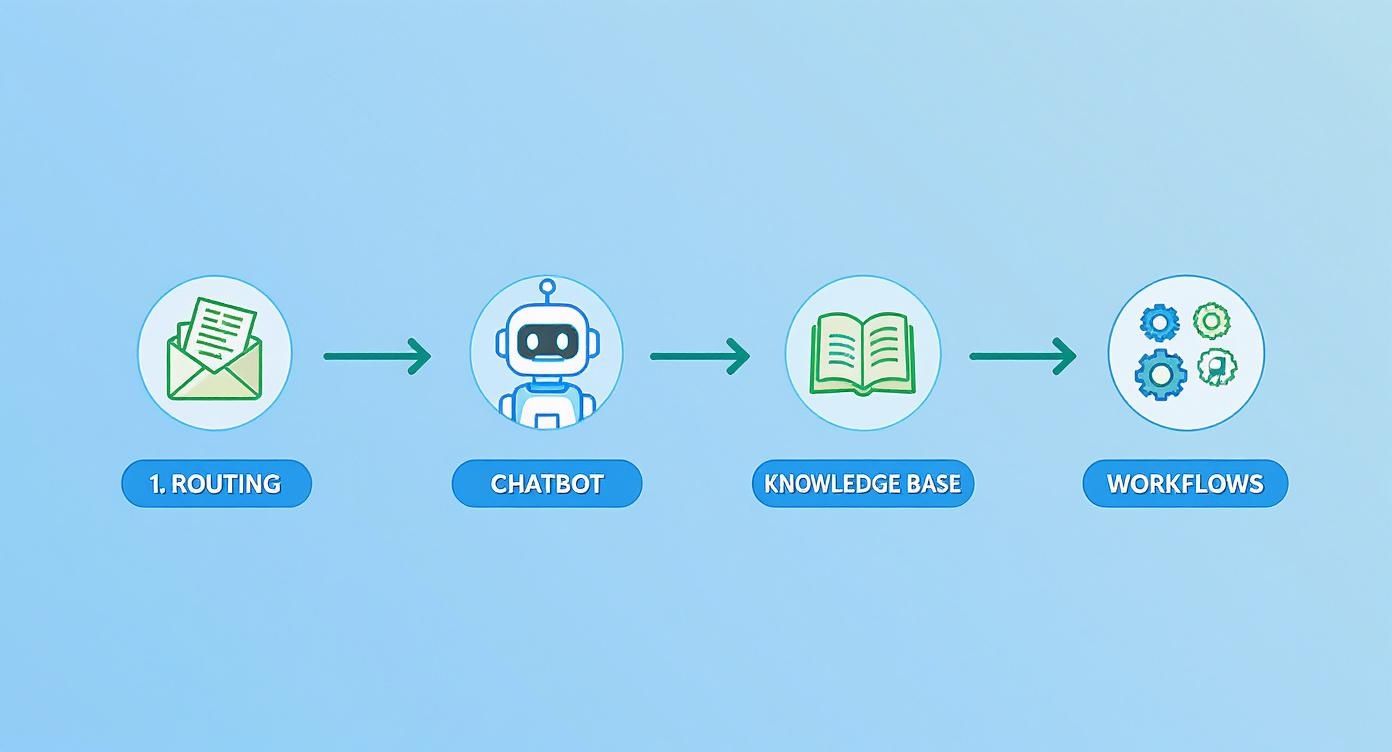
You can see how a customer's request moves smoothly from one step to the next, hitting routing, chatbots, and self-service options before a human agent ever needs to get involved. That’s efficiency in action.
Step 3: Design Your Automated Workflows
This is where your strategy really comes to life. Designing a workflow is all about mapping out the exact logic your automation will follow. It's like writing a script for your system to perform.
For example, a ticket routing workflow might look something like this:
- A new ticket comes in.
- The system scans it for keywords like "billing" or "invoice."
- If it finds a match, the ticket is automatically assigned to the Finance team.
- If not, it goes into the general support queue for a human to look at.
The same thinking applies to chatbot conversations. You have to anticipate the common questions and craft clear, helpful answers. For more on that, you can check out our guide on creating an effective AI customer support chatbot. The trick is to keep your workflows simple at first and always give customers an easy way to reach a person if the automation isn't cutting it.
A well-designed workflow feels intuitive to the customer. It solves their problem with minimal friction and knows exactly when to step aside and let a human take over.
Step 4: Launch, Monitor, and Refine
Your work isn't done once you launch—it’s just beginning. The most critical phase is what comes next: monitoring performance and listening to feedback. Automation isn’t a "set it and forget it" tool; it’s something you have to continuously improve.
Keep a close eye on these key metrics:
- Ticket Resolution Time: Are automated tickets getting solved faster?
- First-Contact Resolution Rate: How many issues are being fully resolved by automation on the first try?
- Customer Satisfaction (CSAT) Scores: Are customers actually happy with their automated interactions?
- Agent Workload: Is your team feeling the relief? Are they reporting less time spent on tedious tasks?
Use this data to see what’s working and what isn’t. Maybe a chatbot response is causing confusion, or a workflow needs another step. Making regular tweaks based on real-world data is how you’ll ensure your help desk automation system keeps getting better and delivering real value.
Real-World Examples of Help Desk Automation
It's one thing to talk about the theory, but seeing help desk automation in the wild is when it all starts to make sense. The concepts of smart ticket routing, AI chatbots, and self-service portals really come alive when you see them solving actual business headaches. Whether it's making online shopping smoother or taking the pain out of corporate IT, these examples show how automation works in the real world.
Let's look at a few examples from different industries. Each one zeroes in on a common problem and shows how a smart automation strategy made a real, measurable difference.
E-commerce: Answering "Where Is My Order?" on Repeat
An online store was getting buried in support tickets, and almost all of them were the same question: “Where is my order?” Their support agents were spending the bulk of their day just looking up tracking numbers and giving status updates. This left them with almost no time to handle more complicated issues like returns or questions about products. It was a classic case of burnout waiting to happen, and it meant other customers were stuck waiting for help.
The fix was to deploy an AI-powered chatbot on their website and connect it directly to their shipping software.
- The Solution: The chatbot was taught to understand all the different ways customers ask about their order status. When a customer asked, the bot simply requested their order number and email.
- The Automation: Using an API, the bot would instantly fetch the latest tracking info from the shipping company and display it right in the chat. No human needed.
- The Result: This one simple automation took care of their most frequent question from start to finish. The company cut its team's workload on this single issue by a whopping 40%. This freed up the agents to focus on conversations that actually required a human brain.
SaaS: Guiding Users to Help Themselves
A growing software company spotted a trend. A huge chunk of their support tickets came from new users asking for help with really basic features. The answers were already in their knowledge base, but people found it quicker to just fire off a ticket. This was putting a serious strain on their small support team and creating a backlog for real technical bugs.
Their solution was to make self-service the easiest possible option.
When you make information dead simple to find, people will use it. It's just human nature. In fact, 81% of customers try to solve their own problems before they even think about contacting a support agent.
The company built an automated suggestion tool right into their support portal. As a user started typing the subject line for a new ticket, the system would instantly scan the keywords and pop up relevant articles from their help center. This proactive help desk automation often answered the question before the user even finished writing the ticket. The result? They cut down new ticket submissions by an impressive 30%.
Corporate IT: Fixing the New-Hire Onboarding Mess
For a big company, getting a new employee set up was a logistical nightmare for the internal IT team. The process was a tangled web of manual tasks: creating user accounts, granting access to the right software, setting up a laptop. It involved multiple teams, took days to complete, and was full of opportunities for human error. It was a terrible first impression for new hires who were eager to start working.
To fix this, the company created a powerful automated onboarding workflow.
- The Trigger: The whole process kicks off the moment HR flags a new employee as "hired" in the company's main system.
- The Workflow: The system automatically creates all the necessary user accounts, puts them in the right permission groups based on their department, and sends out welcome emails with their new login details. It even generates a ticket for the hardware team to prep a laptop.
- The Outcome: What used to be a frustrating, multi-day headache became a process that took just a few minutes. Not only did this make for a much better experience for new employees, but it also saved the IT team hundreds of hours every single month.
Best Practices for a Successful Automation Strategy
Getting your help desk automation up and running is a huge step, but the real work has just begun. The most successful strategies treat automation not as a "set it and forget it" tool, but as a dynamic part of your entire support system. By following a few best practices, you can make sure your automated tools are actually helping people, not just creating more frustration.
The secret is to think big but start small. You don't need to automate every single process on day one. A much better approach is to pick a few high-impact, low-risk tasks to start with. Think password resets or simple order status questions. This lets you learn the ropes, see what works, and get some quick wins under your belt before you tackle more complicated workflows.
Keep the Human Touch in the Loop
Even the smartest automation can't handle everything. There will always be tricky, sensitive, or emotional situations that need a real person with empathy and critical thinking skills. A core principle of great help desk automation is knowing when it's time to smoothly pass the conversation to a human agent.
Build your chatbots and automated flows with clear escape routes. If a customer repeats a question or types "talk to a person," the system should know to immediately create a ticket and get them to someone who can help. This way, automation improves the customer experience instead of becoming a wall that blocks them from getting answers.
Continuously Train Your AI
Your automated tools are only as good as the information you give them. Think of your knowledge base and chatbot responses as living documents, not static files. They need constant updates and tweaks based on new customer questions and interactions. Make a habit of checking your chatbot logs and failed self-service searches to spot where the gaps are.
Following solid knowledge base best practices is essential here, as it ensures your self-service options are genuinely effective. When you launch a new product or update a policy, make updating your automated resources a top priority. This ongoing training keeps your AI sharp, accurate, and truly helpful.
"Your automation tools should evolve alongside your business. A well-maintained knowledge base is the brain of your automated support, and it needs to be fed new information to stay effective."
Prioritize the User Experience
At the end of the day, automation is supposed to make life easier for your customers. Every single automated workflow and chatbot conversation should be designed from their perspective. That means using clear, simple language, skipping the jargon, and making every step feel natural.
The best way to know if you're succeeding is to ask for feedback. Ask your users directly about their experience with your automated tools.
- Did the chatbot understand your question?
- Was the self-service article helpful?
- Was it easy to connect with an agent when you needed one?
This kind of feedback is pure gold. It shows you exactly where the friction points are so you can smooth them out. When you obsess over creating a positive user experience, you build an automation strategy that doesn't just make your team more efficient—it also builds stronger customer loyalty.
Answering Your Questions About Help Desk Automation
It's completely normal to have a few questions before jumping into something like help desk automation. Many teams wonder if it means replacing people or where on earth to even begin. Let's tackle some of the most common questions to clear things up.
Is This Going to Make Our Support Agents Obsolete?
Absolutely not. Think of it less as a replacement and more as a promotion. Automation is brilliant at handling the dull, repetitive tasks that clog up your team's day and often lead to burnout.
By taking over that grunt work, automation frees up your people to handle the tricky, high-stakes issues that actually require a human touch. Your team gets to spend their time on complex problem-solving and building real relationships with customers, shifting from just closing tickets to proactively making customers happy.
Where Should We Start? What's the First Thing to Automate?
The best place to start is with the low-hanging fruit: tasks that are simple, predictable, and happen all the time. Your own support ticket data is a goldmine for finding these opportunities.
Dig into your tickets and look for patterns. You'll likely find things like:
- Password Resets: The classic example of a straightforward task that's perfect for automation.
- Order Status Questions: Simple lookups for things like "Where's my stuff?" can easily be handled by a bot.
- Basic Ticket Sorting: Automatically tag new requests and send them to the right person or department.
Nailing these quick wins shows immediate results and builds the confidence you need to take on more ambitious automation projects.
The biggest hurdle isn't the technology itself; it's designing automated workflows that actually help people without causing more headaches. A clunky chatbot is often worse than no chatbot at all.
It's so important to map everything out thoughtfully. And always, always make it easy for a customer to connect with a real person if the automated system can't solve their problem. That’s how you make sure technology improves the customer experience instead of getting in the way.
Ready to see how a smart chatbot can transform your customer support? Yoonoo lets you build and launch an AI-powered chatbot in just five minutes, no coding required. Start your free trial and see it in action.