Top Digital Customer Service Tools to Enhance Support

At its core, digital customer service tools are the platforms that help businesses talk to their customers. Think of all the ways people can reach out these days—email, live chat on your website, social media DMs, and more. These tools bring all those conversations into one organized place.
Instead of your team jumping between a dozen different tabs, they get a single, unified command center to track, manage, and solve customer problems.
Why Digital Customer Service Tools Matter Now
Remember when a single phone line was all a business needed for customer support? Those days are long gone. Today's customers want answers, and they want them fast, wherever they happen to be. They expect you to be available on your website, on Instagram, or via a quick email from their phone.
This demand for instant, always-on support is exactly why modern service tools have become so essential.

Think of these tools as the engine that powers your entire support operation. They tame the chaos. Instead of your agents trying to keep track of Facebook messages, a cluttered email inbox, and a live chat window simultaneously, everything flows into one clean, manageable dashboard.
This isn't just about making life easier for your team—it creates a much better, smoother experience for your customers. No one gets forgotten. Every person gets the same level of care, no matter how they contact you. The result? A customer who feels heard and valued, every single time.
The Evolution from Traditional to Digital Support
Moving to digital-first service is more than just adding a chat widget to your site; it’s a fundamental shift in how you think about helping people. Old-school support was reactive. You waited for the phone to ring. Digital service, when done right, is proactive and smart.
The real magic of these platforms is turning customer service from a necessary expense into a powerful way to build loyalty and keep customers coming back. It’s about building relationships, not just closing tickets.
Modern tools give you the power to see problems coming, offer helpful self-service options, and solve issues before they ever blow up. This whole shift is happening for a few key reasons:
- Sky-High Customer Expectations: Research consistently shows that most customers—sometimes as many as 86%—will happily pay more for a great experience. Fast and easy support isn't a bonus anymore; it's the bare minimum.
- The Need for Efficiency: As you grow, trying to handle every request by hand just doesn't work. You need smart workflows and automation to manage a higher volume of questions without sacrificing quality. For a great deep-dive on this, check out the ultimate guide to customer support automation.
- Insights Hidden in Data: Digital tools collect a goldmine of information about what customers struggle with, how your team is performing, and which problems pop up most often. This data helps you make smarter decisions to improve your products and services over time.
In the end, investing in the right digital customer service tools isn't really a choice anymore. It's a must-have for any business that wants to stay competitive, empower its team, and build a reputation for truly outstanding service.
Exploring the Core Features of Support Platforms
Jumping into the world of digital customer service tools can feel a bit overwhelming at first. But the truth is, the best platforms aren't built on confusing tech jargon. They’re designed around a handful of key features that simply make it easier to help people. Let's pop the hood and see what makes these tools tick.
The demand for this kind of software is exploding. The global market was valued at around $10.8 billion in 2023 and is projected to hit a staggering $43 billion by 2033. This growth is all about flexible, cloud-based solutions that let businesses of any size offer incredible support. You can get a deeper look at these market trends in this in-depth industry report.
This infographic gives a great bird's-eye view of how a modern support platform is put together.
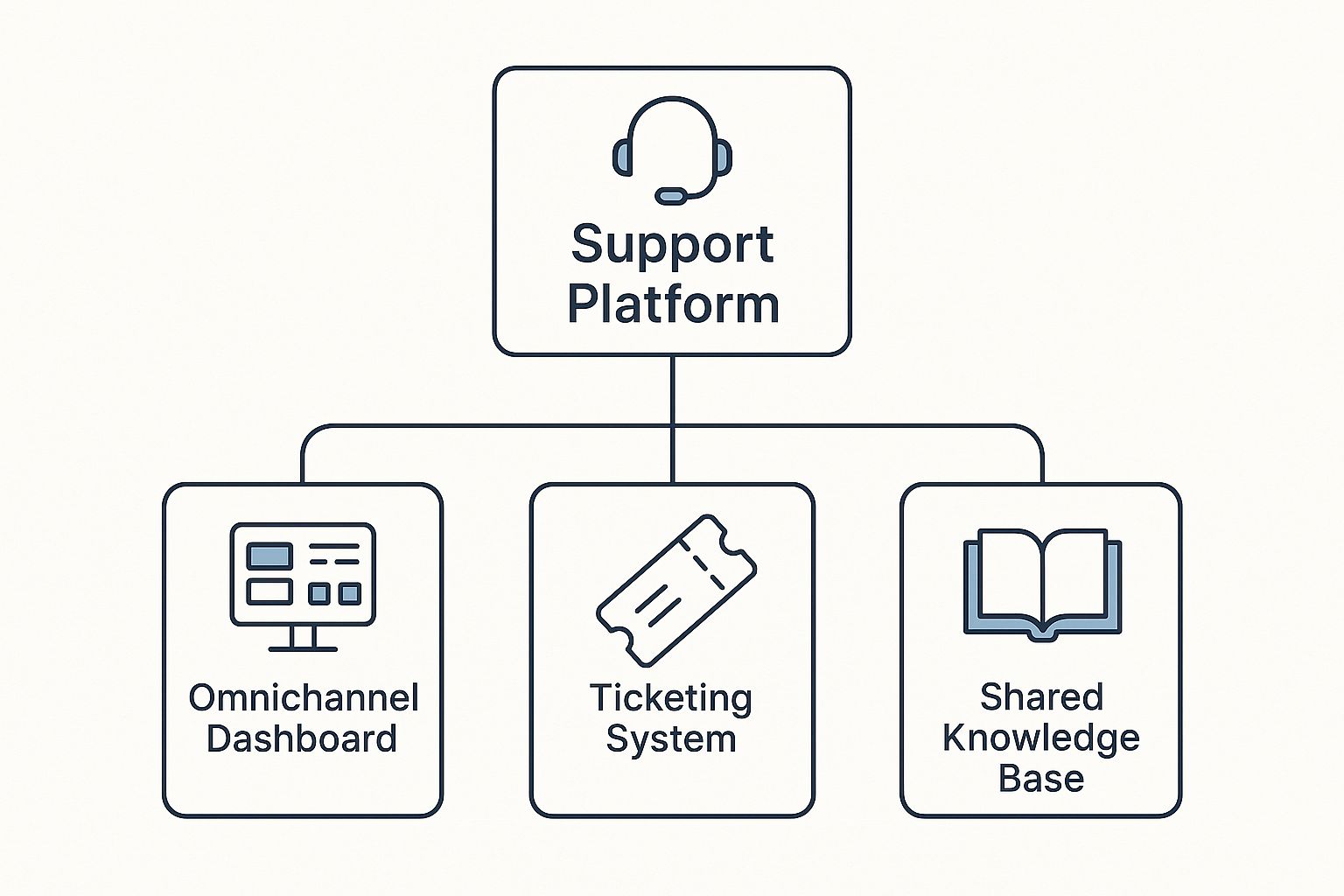
As you can see, the Omnichannel Dashboard, Ticketing System, and Shared Knowledge Base are the real workhorses of any solid support platform. Let's break down what each one actually does.
The Omnichannel Dashboard: Your Universal Inbox
Imagine trying to follow a conversation happening across text messages, emails, and social media DMs all at once. It would be a nightmare. Yet, this is the reality for many support teams trying to manage different channels separately.
An omnichannel dashboard fixes this by pulling everything into one universal inbox.
Every single message—whether it’s from live chat, a Facebook message, or a standard support email—lands in a single, unified feed. This gives your agents the full story of every customer interaction without them having to juggle a dozen browser tabs. They see past issues and previous chats, which leads to faster, more personal, and way more effective support.
A great dashboard doesn't just collect messages; it provides context. It turns a scattered series of interactions into a single, continuous conversation, making the customer feel known and understood.
With this unified view, no customer query gets lost in the shuffle, no matter how they decide to reach out.
The Ticketing System: Your Digital Filing Cabinet
If the dashboard is your team's inbox, then the ticketing system is the ultimate digital filing cabinet. Every new customer inquiry, from a simple question to a complex technical issue, is logged as a "ticket." This ticket becomes the official record for that specific problem.
Think of it as a unique case file. Each ticket gets a number, an owner (the agent working on it), a status (like "Open," "In Progress," or "Resolved"), and a priority level. This simple but powerful system brings a sense of calm and order to the often chaotic world of customer support.
This structure allows your team to:
- Track every single request from the moment it comes in until it's resolved, ensuring nothing falls through the cracks.
- Prioritize urgent issues so the most critical problems get immediate attention.
- Collaborate seamlessly by leaving internal notes for other team members right on the ticket.
- Measure team performance by analyzing how long it takes to solve different types of problems.
Without a ticketing system, managing support is like trying to run an office with papers scattered everywhere. With one, every piece of information has a home, making the whole process efficient and accountable.
The Shared Knowledge Base: Instant Answers for Everyone
A shared knowledge base is basically a centralized library of information for both your support agents and your customers. It's packed with how-to guides, frequently asked questions (FAQs), troubleshooting steps, and detailed product info.
For your team, it's the single source of truth. New agents can get up to speed in record time, and even seasoned pros can quickly find answers to obscure questions without having to track down a manager. This ensures every customer gets the same accurate information, every time.
For your customers, it’s a powerful self-service option. The reality is, many people would rather find an answer on their own than contact support. A well-organized knowledge base empowers them to do just that, which cuts down on your team's ticket volume and frees them up to handle more complex issues that need a human touch.
To really see how these features come together, let's look at their direct impact on the quality of your service.
Key Features and Their Impact on Service Quality
| Feature | What It Does | Benefit for Support Team | Benefit for Customer |
|---|---|---|---|
| Omnichannel Dashboard | Consolidates all customer conversations from various channels (email, chat, social media) into a single view. | Agents have full context of a customer's history without switching between apps, improving efficiency and reducing response times. | Customers don't have to repeat themselves. They get a consistent experience no matter how they make contact. |
| Ticketing System | Logs, tracks, and manages every customer inquiry as a unique "ticket" with a status, owner, and priority. | Creates a clear, organized workflow. Nothing gets missed, and managers can easily track performance and workload. | Customers get a confirmation that their issue is being handled and can often track its progress toward resolution. |
| Shared Knowledge Base | A centralized, searchable library of articles, FAQs, and guides for both internal and external use. | Provides agents with instant access to accurate information, ensuring consistent answers and faster training for new hires. | Empowers customers to find answers on their own 24/7, offering immediate solutions without needing to wait for an agent. |
As the table shows, each feature is designed not just to make your team's life easier, but to directly improve the customer's experience from start to finish.
How AI Is Supercharging Customer Support
Artificial intelligence isn't some futuristic concept anymore; it's here now, and it's fundamentally changing how customer support gets done. Think of AI as a brilliant, tireless assistant for your support team, working around the clock to make their jobs easier and customer conversations smoother. The goal isn't to replace your agents but to give them superpowers, making them faster, smarter, and more effective.
The growth in this space is staggering. The AI customer service market was valued at around USD 13 billion in 2024, but it’s projected to explode to nearly USD 84 billion by 2033. This boom is being fueled by new tech that lets AI handle increasingly complex problems on its own, especially in North American retail and e-commerce. You can dig into the numbers and trends in this comprehensive AI market report.

AI takes standard digital customer service tools and makes them truly intelligent. Let's break down a few practical ways it's making a real difference right now.
Automating the Routine with Smart Chatbots
Chatbots are probably the first thing that comes to mind with AI support, and for good reason. Today’s AI chatbots are light-years ahead of the clunky, script-following bots from a few years ago. These smart assistants can instantly handle a massive volume of common questions—any time, day or night.
They serve as the first line of defense, fielding queries like "Where is my order?" or "How do I reset my password?" This frees up your human agents to focus their energy on the complex, nuanced problems where a personal touch really matters. Of course, the magic happens when you know how to train a chatbot with your own data so it can give answers that are actually helpful and specific to your business.
Understanding Customer Emotions with Sentiment Analysis
AI can also give your team a kind of superpower: the ability to read the emotional tone of a conversation. Sentiment analysis tools scan incoming messages—be it emails, chats, or social media posts—to figure out if a customer is happy, frustrated, or just neutral.
By automatically flagging conversations with negative sentiment, AI gives agents a crucial heads-up. They can walk into a tough situation with more empathy and care, often turning a bad experience into a great one before it ever escalates.
This isn't just about putting out fires. It helps your team prioritize the most urgent issues and gives them the context they need to understand the person behind the problem.
Empowering Agents with AI-Powered Assistance
Beyond handling tickets on its own, AI is an incredible co-pilot for your human agents. This is where the partnership between people and technology truly shines, transforming an agent's entire workflow.
- Suggested Responses: Instead of typing every response from scratch, generative AI can instantly draft replies that are accurate, on-brand, and empathetic. Agents can use them as is or tweak them, saving a huge amount of time.
- Ticket Summarization: No one likes reading through a long, winding conversation history. AI can create a quick summary in seconds, so an agent can get up to speed instantly when a ticket is handed off.
- Knowledge Base Integration: When a customer asks a question, AI can find the perfect help article from your knowledge base and suggest it to the agent, ensuring answers are fast and consistent.
These tools work together to create a support environment that’s more efficient and less stressful. By taking care of the repetitive tasks and offering smart suggestions, AI frees up your agents to do what they do best: solve tough problems and build real relationships with customers. You can see more of what’s possible by exploring the wide range of https://yoonoo.ai/blog/ai-customer-service-tools available today.
The Real-World ROI of Investing in Support Tech
It's easy to think of new customer service tools as just another expense, a line item on a budget. But that’s a shortsighted view. When you invest in the right support technology, you aren't just buying fancy features; you're building a powerful engine for growth that delivers a real, measurable return.
Think about it: better tools lead to a better support experience, and a better support experience builds a healthier business. It starts with obvious financial wins. Smart tools like a well-stocked knowledge base or an AI-powered chatbot can instantly resolve all those common, repetitive questions. This immediately cuts down on the number of support tickets your agents have to handle, freeing them up and lowering your operational costs.

This isn’t just about saving money, though. It's about fundamentally changing how your support team works for the better. When your best people aren't stuck resetting passwords or checking on order statuses all day, they can finally focus on the complex, high-stakes problems where their expertise truly matters.
Boosting Team Efficiency and Performance
The right tech acts as a force multiplier for your support agents. Instead of scrambling between different inboxes and digging for customer information, they get a single, unified view of every customer's entire history. This simple change unlocks some serious efficiency gains.
- Faster Fixes: Agents can solve issues on the first try far more often when they have customer data and internal knowledge at their fingertips.
- More Capacity, Less Burnout: Automating simple tasks and using quick response templates means each agent can manage more conversations without feeling completely overwhelmed.
- Rock-Solid Consistency: A central platform ensures every agent is sharing the same correct, on-brand information, which makes your entire support operation feel more professional and reliable.
The numbers don't lie, especially when it comes to AI. An incredible 90% of customer experience leaders see a positive ROI after bringing in AI. On top of that, 79% of support agents say AI assistants make them better at their jobs. This data paints a clear picture: technology and people working together is the future of great service. You can explore more customer support trends and statistics that back this up.
The point of support tech isn't to replace your team—it's to empower them. It clears the clutter from their workflow so they can bring their focus and empathy to the moments that truly matter.
The Financial Upside of Happy Customers
The biggest ROI, however, often comes from something simple: keeping your customers happy. A smooth, helpful, and empathetic support experience is one of the strongest drivers of loyalty you have. Happy customers don't just get their problem solved and leave; they stick with you, spend more over time, and tell their friends about you.
This link between great service and your bottom line is direct. We all know it costs way more to land a new customer than to keep an existing one. By investing in tools that make your support interactions positive, you're directly investing in your long-term revenue. Every bit of friction you remove is another customer you're likely to keep for the long haul.
In the end, making the business case for these tools is pretty straightforward. The technology pays for itself by cutting costs, making your team more productive, and—most importantly—creating a base of loyal, satisfied customers who will keep your business thriving.
How to Choose the Right Tools for Your Business
Picking the right digital customer service tools can feel like a huge decision, but it doesn't have to be overwhelming. With a solid game plan, you can cut through the noise and find the perfect fit for your team. Remember, you're not just buying software—you're looking for a partner that will help you grow.
The first step is always to look inward. Before you get dazzled by flashy features you might never use, take a moment to assess where you are right now. How big is your support team? How many customer conversations are you handling each day? And most importantly, where are your customers trying to reach you?
Answering these simple questions gives you a starting point. A small ecommerce shop, for instance, might need top-notch social media and email support. A larger B2B company, on the other hand, might be desperate for a powerful knowledge base and advanced ticketing. Getting this internal snapshot right is the single most important step to finding a tool that solves your actual problems.
Evaluating Your Core Requirements
Once you know what you need, you can start lining up vendors and seeing how they stack up. This is where you get past the marketing hype and into the nitty-gritty. Think of it like test-driving a car—you need to see how it performs on your roads, not just the perfectly paved ones in the brochure.
When you're evaluating, focus on three main things: scalability, integrations, and the overall user experience.
-
Scalability: The tool you pick today needs to work for you tomorrow. Ask yourself, can this platform handle a 50% jump in customer requests next year? Will the pricing cripple us as we add more agents? A scalable tool saves you the massive headache of switching systems right when your business is hitting its stride.
-
Integrations: Your customer service hub doesn't operate on an island. It has to play nicely with your other essential tools, like your CRM or ecommerce platform. Without smooth integrations, you create annoying data silos and force your team to waste time toggling between a dozen different tabs.
-
User Experience (UX): A tool can have all the power in the world, but if your team hates using it, it’s useless. The interface needs to feel natural and easy to navigate without weeks of training. A clean, friendly design helps your agents work faster and feel less stressed, and that positive energy flows directly to your customers.
Asking the Right Questions During Demos
Product demos and free trials are your golden opportunity to put these tools to the test. Don't just be a passive observer. Show up with a list of sharp, specific questions that get to the heart of what matters to you. This is how you cut through the sales pitch and really understand how the software will function day-to-day.
The most successful software implementations happen when a business chooses a partner, not just a product. A good vendor will want to understand your challenges and show you precisely how their tool can help solve them.
To help you get started, we've put together a checklist of critical questions to ask when you're comparing providers.
Vendor Evaluation Checklist
This checklist is designed to help you dig deeper during demos and sales calls. Use it to compare different platforms and make sure you're covering all your bases before making a final decision.
| Category | Question to Ask | Why It Matters |
|---|---|---|
| Onboarding & Support | What does the implementation process look like? What kind of training and ongoing support do you provide for our team? | A smooth setup and reliable support are crucial for long-term success. You don't want to be left stranded after you sign the contract. |
| Reporting & Analytics | Can you show me exactly how we can track agent performance, customer satisfaction (CSAT), and common ticket themes? | You can't improve what you don't measure. Robust analytics are vital for making data-driven decisions. |
| Integrations | Does your platform have pre-built integrations with our key tools, like our CRM and marketing automation software? | Seamless connections prevent data silos and wasted time, creating a single source of truth for your customer information. |
| Scalability & Pricing | How does your pricing change as my team and customer volume grow? Are there any hidden fees or contract lock-ins? | You need a tool that grows with you without breaking the bank. Transparent pricing helps you plan for the future. |
| Security & Compliance | How do you protect our customer data? Can you provide details on your security protocols and any compliance certifications you hold? | Protecting customer data isn't optional. A trustworthy platform will have clear and stringent security measures in place. |
By taking the time to ask these questions, you’re not just buying a tool; you're making a strategic investment. This methodical approach ensures you find a solution that not only handles today's challenges but is ready to grow with you for years to come.
Getting Your New Tools Up and Running
So, you’ve picked out your new digital customer service tools. That's a huge step, but the real magic happens when you weave them into the fabric of your daily work. Think of it less like flipping a switch and more like carefully integrating a new system—one that needs to work seamlessly for your team, your data, and most importantly, your customers.
The first move is to map everything out. This isn't the time to rush. You'll want to think through migrating your existing customer data, configuring new workflows, and tweaking the platform so it feels like it was made just for you. Getting this right from the start saves a world of trouble down the road.
Start with a Pilot Program
Instead of throwing everyone into the deep end at once, start small. Handpick a dedicated pilot group to take the new system for a spin. This is your dress rehearsal, a chance to find and fix any glitches in a low-stakes environment before a full-scale launch.
This small team will become your best source of feedback. They’ll tell you what’s working, what’s clunky, and what needs to change. Their hands-on experience helps you smooth out the rough edges and create a playbook that will make the company-wide rollout a success.
The point of a pilot isn't just to test software—it's to build champions. When that initial group starts raving about the new tools, their excitement is contagious and helps get the rest of the team on board.
Once you’ve collected their feedback and fine-tuned the setup, it’s time to build out a solid training plan. The aim is to make every single agent feel like a pro from their very first day.
Train Your Team for Success
Great training is about more than a quick tour of the dashboard. It needs to connect the dots, showing agents how these new tools directly help them make customers happier, faster. A team that truly understands the "why" behind the new software is your key to getting a real return on your investment.
Make sure your training covers the essentials:
- Core Workflows: Walk them through the entire lifecycle of a support ticket, highlighting features that keep things moving smoothly.
- Communication Channels: Show them the power of the omnichannel view, where email, chat, and social media messages all live in one place.
- Knowledge Base Usage: Teach them how to quickly pull up and share knowledge base articles for consistent, accurate answers.
Never Stop Improving
The launch isn't the end of the project—it’s the beginning. The best support teams are always looking for ways to get better, and your new platform's analytics are your treasure map.
Keep an eye on the data to spot patterns. Are lots of customers asking the same question? That’s your cue to update the knowledge base or teach your chatbot a new trick. Speaking of which, chatbots need ongoing care to stay sharp. For a deeper dive, check out our guide on the best AI customer support chatbot platforms available.
By constantly checking your performance, listening to your team, and making small, consistent tweaks, you’ll do more than just use new software. You’ll build a smarter, more customer-centric way of working.
Common Questions About Customer Service Tools
Even when the path to better support seems clear, it's natural to have a few nagging questions before bringing new digital customer service tools on board. It’s always smart to tackle these concerns head-on. Getting the answers builds the confidence your team needs to make the leap.
One of the first questions is almost always about the price tag: "How can I justify this expense?" The trick is to shift your perspective. This isn't just another line item on a budget; it's an investment that pays for itself.
To prove it, build your business case around two key areas: efficiency gains and keeping your customers happy (and sticking around).
Think about all the time you'll save by automating repetitive tasks. If a chatbot can handle 25% of your most common questions, that frees up your human agents to focus on the tricky, high-stakes problems where they really shine. This productivity bump means you can handle more customer conversations without having to immediately hire more people.
Is This Technology Only for Big Companies?
Another hang-up I hear a lot is the idea that these platforms are only for giant corporations with bottomless budgets. That couldn't be further from the truth. The market today is full of scalable solutions built specifically for small and medium-sized businesses.
Many modern tools offer flexible pricing that's based on how much you actually use them. This means a small team can get started with the basics and add more features as the company grows. You don't need a massive upfront investment to start giving your customers an amazing support experience.
The best platforms are designed to grow with you. They give a small business the tools it needs to compete today, with the power and scale to support a much larger operation down the road.
This flexibility really levels the playing field. It gives smaller companies access to the same powerful technology that was once only available to the big guys. The right tool lets you deliver fantastic service, no matter how big or small your company is.
How Do We Balance Automation with a Human Touch?
Finally, there's the big one: the fear of losing that "human touch." Will automation make our service feel cold and impersonal? It's a totally valid concern, but it’s usually based on an old-school view of what automation is for.
The goal isn't to replace your team—it's to make them better. You use AI for the simple, repetitive stuff where speed and efficiency matter most, like tracking an order or resetting a password.
This saves your team's most valuable assets—their empathy and critical thinking skills—for the moments that really count. When a customer is truly frustrated or has a complicated issue, nothing can replace a well-supported human agent.
This approach gives you the best of both worlds: instant, 24/7 support for common questions and thoughtful, human help for everything else.
Ready to see how an AI chatbot can handle routine questions and free up your team? Yoonoo lets you build and launch a smart chatbot in just five minutes, no coding required. Start improving your customer communication today by visiting the Yoonoo website.