10 Smart Business Process Automation Examples
Business process automation (BPA) isn't just for mega-corporations with huge budgets. It's the secret weapon that allows small businesses and support teams to eliminate tedious tasks, reduce errors, and focus on what truly matters: growth and customer satisfaction. The best way to understand the power of automation is to see it in action.
This guide moves beyond theory to break down 10 practical business process automation examples across different departments, from customer support to finance. We'll provide a strategic blueprint you can adapt for your own operations, detailing the "how" and "why" behind each use case. To fully grasp its potential, it helps to understand the foundational concepts. If you're new to the topic, this guide on What is Workflow Automation? provides an excellent primer on the core principles.
Our goal is simple: to give you actionable tactics and a clear path to implementation. Instead of just listing what's possible, we'll show you replicable strategies for customer onboarding, invoice processing, lead management, and more. You'll get the insights needed to stop drowning in manual work and start scaling your success. Let's explore how you can put automation to work for you.
1. Invoice Processing Automation
Invoice processing automation is a game-changer for accounts payable (AP) departments. It uses software to digitize and streamline the entire invoicing lifecycle, from receipt to payment, eliminating the need for tedious manual data entry. The system uses Optical Character Recognition (OCR) and AI to automatically capture data from invoices, match it against purchase orders and receipts, and route it for approval.
This technology significantly reduces human error and accelerates processing times from days to mere minutes. For example, global powerhouse Siemens cut its invoice processing time by 60%, and Coca-Cola European Partners now handles over two million invoices annually with automation. These results make it one of the most impactful business process automation examples for any company dealing with a high volume of supplier invoices.
How It Works: A Three-Step Flow
The automated process transforms a traditionally paper-heavy task into a streamlined digital workflow. It follows a clear, efficient sequence to ensure accuracy and speed. The infographic below illustrates the core steps of this automated journey.
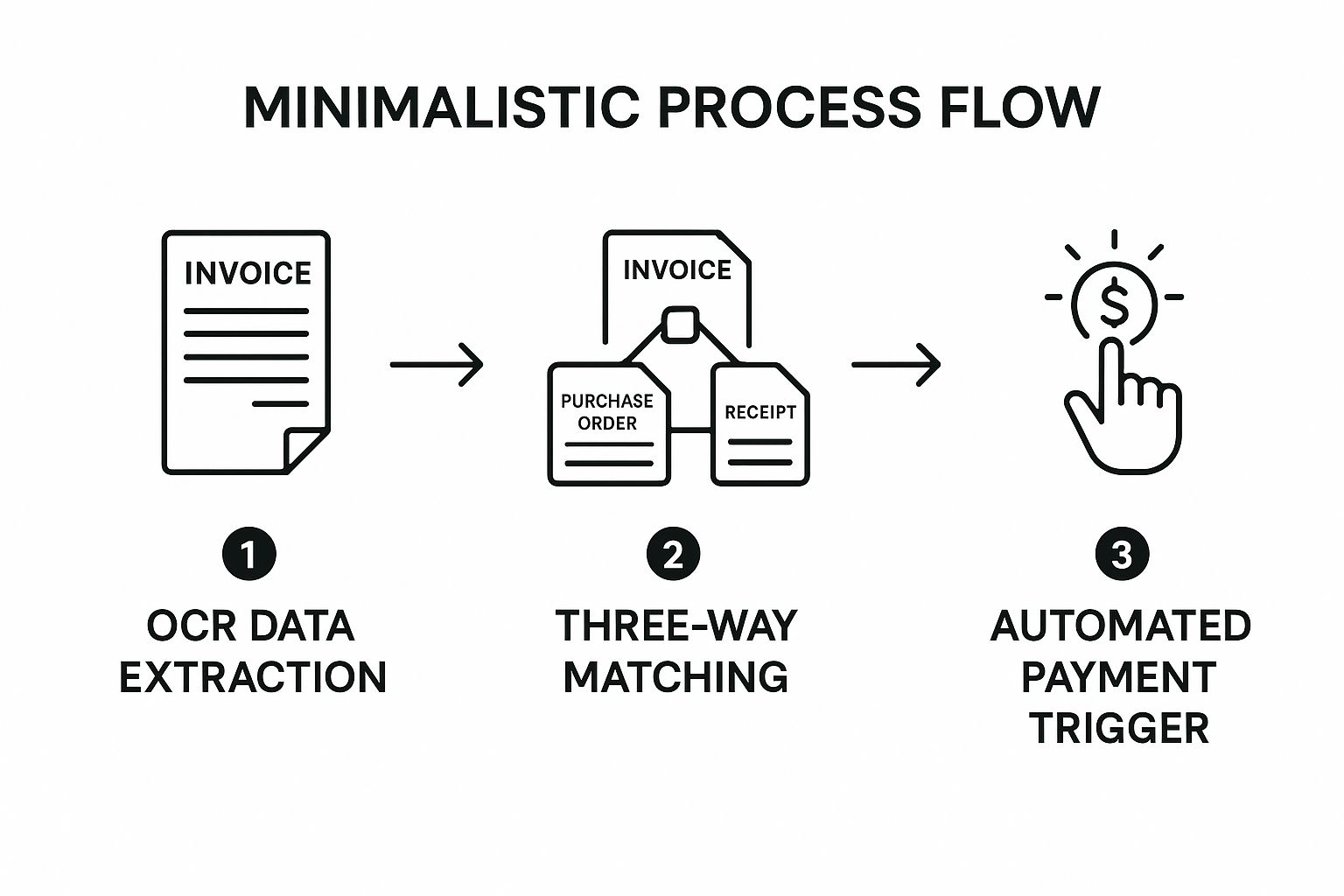
This visual highlights how automation creates a touchless system where invoices are validated and paid without manual intervention, freeing up your finance team for more strategic work.
Actionable Takeaways
- Start Small: Begin by automating high-volume, standardized invoices from your key vendors to prove the concept and demonstrate ROI quickly.
- Integrate Systems: Connect your automation software (like Bill.com or Tipalti) with your existing Enterprise Resource Planning (ERP) system for a seamless flow of financial data.
- Establish Clear Rules: Define precise approval thresholds and routing rules within the software to ensure invoices are sent to the correct approver automatically. This prevents bottlenecks and maintains financial controls.
2. Customer Onboarding Automation
Customer onboarding automation transforms the critical first impression for new clients. It uses software to guide customers through setup, document collection, verification, and service activation, creating a seamless and efficient welcome experience. The system automates communication sequences, collects necessary information, and provisions access without manual intervention.
This approach significantly reduces the time and effort required from both your team and the customer, minimizing friction and accelerating time-to-value. For instance, Stripe cut its complex customer verification process from days to just minutes, while digital bank N26 allows users to open a full bank account in under 8 minutes. These successes make it a powerful business process automation example for companies focused on customer experience and scalability.
How It Works: A Guided Digital Journey
The automated process turns a potentially complex and high-touch procedure into a streamlined, self-service workflow. It ensures consistency and speed by guiding users through a predefined set of steps. The infographic below illustrates the core stages of this automated onboarding flow.
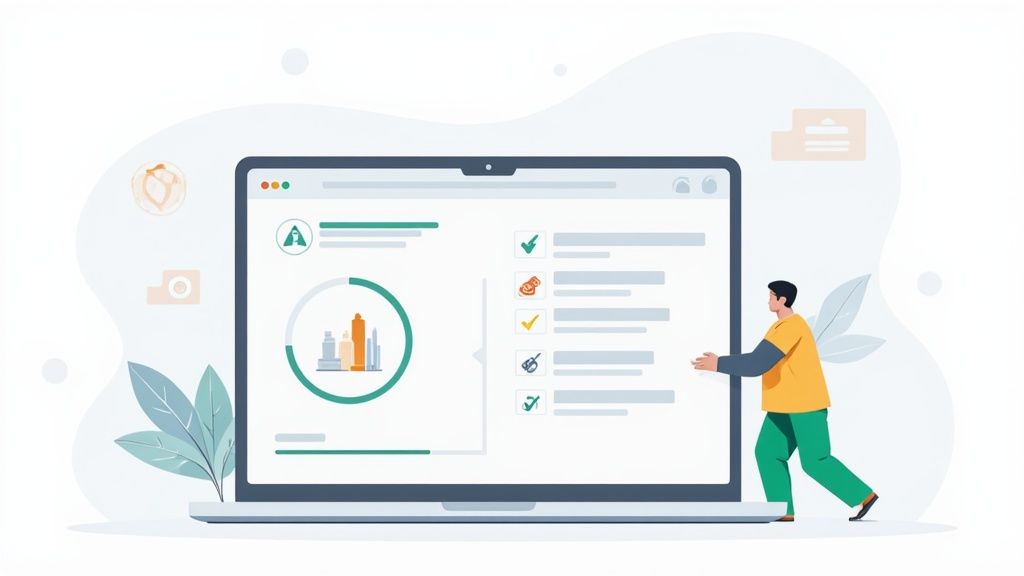
This visual highlights how automation creates a structured yet flexible path, ensuring customers feel supported and confident as they begin using your product or service.
Actionable Takeaways
- Map the Journey: Before implementing any tools, clearly outline every step of your ideal customer onboarding process. This blueprint will guide your automation rules. For more details, explore these customer onboarding best practices.
- Personalize Communications: Use automation software (like HubSpot or Salesforce) to insert customer names, company details, or other specific data into your emails and in-app messages to maintain a personal touch.
- Provide an Escape Hatch: Always include a clear, easy way for customers to contact a human support agent if they get stuck. This prevents frustration and abandonment.
3. Email Marketing Automation
Email marketing automation uses software to send targeted, personalized emails to customers based on specific triggers or schedules, eliminating manual campaign execution. The system segments audiences, customizes content, and schedules delivery in response to user actions like website visits, purchases, or cart abandonments. This enables sophisticated nurture campaigns and lifecycle marketing at scale.
This approach transforms generic email blasts into timely, relevant conversations that drive engagement and sales. For example, Amazon’s automated product recommendation emails drive an estimated 35% of its revenue, while Airbnb’s automated local guide emails boost user engagement by 300%. These powerful outcomes make it one of the most vital business process automation examples for any business focused on customer relationship management and growth.
How It Works: A Three-Step Flow
Automated email marketing turns customer behavior into immediate, personalized communication. It follows a simple yet powerful sequence: a trigger initiates a specific, pre-defined email workflow designed to nurture the customer relationship. This process runs continuously in the background to engage users at the right moment.
The core steps involve identifying a user action (the trigger), segmenting the user into a specific audience, and deploying a relevant, automated email sequence. This creates a responsive system that nurtures leads and customers without constant manual oversight, allowing marketing teams to focus on strategy.
Actionable Takeaways
- Start with Key Triggers: Begin by automating a welcome email series for new subscribers and an abandoned cart sequence for e-commerce. These two campaigns offer a high return on investment and are easy to set up.
- Segment Beyond Demographics: Use behavioral data, such as purchase history, pages visited, or email engagement, to create highly targeted audience segments. This makes your automated messages far more effective.
- Integrate and Personalize: Connect your automation platform (like Mailchimp or HubSpot) with your CRM or e-commerce store to pull in rich customer data for deep personalization, such as using a customer's first name or referencing a recently viewed product.
4. HR and Payroll Automation
HR and payroll automation transforms human resources by digitizing core functions like employee data management, time tracking, benefits administration, and payroll processing. The system automatically gathers timesheet data, calculates wages with precise tax deductions, generates pay stubs, and processes direct deposits. This eliminates manual administrative burdens and ensures employees are paid accurately and on time.
The impact is substantial. Walmart automated time tracking and payroll for over two million employees, ensuring consistency and accuracy at a massive scale. Similarly, Netflix manages its unlimited PTO policy with an automated system that tracks leave without manual oversight. These successes demonstrate why HR and payroll are some of the most powerful business process automation examples for improving operational efficiency and employee satisfaction.
How It Works: A Three-Step Flow
The automated workflow turns a complex, compliance-heavy function into an efficient and reliable cycle. It follows a logical sequence to manage everything from time collection to final payment, ensuring accuracy at every stage.
This flow minimizes manual touchpoints, collecting employee hours, calculating pay, and processing payments seamlessly. Automating this critical function allows HR teams to focus on strategic initiatives like employee development and talent acquisition rather than administrative paperwork.
Actionable Takeaways
- Audit Data First: Before migrating, conduct a thorough audit of all employee data to ensure accuracy. Clean records prevent payroll errors and implementation delays.
- Prioritize Integration: Choose a system like Gusto or Rippling that integrates smoothly with your existing time-tracking and accounting software for a unified data flow.
- Run Parallel Payrolls: Before fully transitioning, run the automated system in parallel with your old method for two or three pay cycles. This helps identify and fix any discrepancies without impacting employee paychecks.
5. Lead Management and Qualification Automation
Lead management automation streamlines how businesses capture, nurture, and qualify potential customers. This system automatically collects leads from various channels, scores them based on predefined criteria like engagement and fit, and routes the most promising prospects to the sales team. It ensures that sales representatives focus their energy on leads with the highest conversion potential.
This approach prevents valuable leads from slipping through the cracks and accelerates the sales cycle. For instance, Trunk Club utilized HubSpot's lead scoring to boost qualified leads by 51%, and Dell's use of Marketo increased its sales pipeline by 40%. These results highlight how lead management is one of the most crucial business process automation examples for scaling revenue and improving sales efficiency.
How It Works: A Three-Step Flow
Automated lead management transforms the complex process of guiding a prospect from initial interest to sales-readiness into a seamless, data-driven workflow. It establishes a clear sequence to nurture relationships and identify the best opportunities without manual oversight. The core steps involve capturing leads, scoring their potential, and routing them for the right follow-up action.
This flow ensures that every lead receives timely, relevant communication while empowering the sales team to engage with prospects at the perfect moment, maximizing their chances of success.
Actionable Takeaways
- Define Your Ideal Customer: Start by creating a clear Ideal Customer Profile (ICP). This will form the foundation for your lead scoring rules, ensuring you prioritize the right prospects.
- Align Sales and Marketing: Work closely with the sales team to define what constitutes a "sales-qualified lead" and establish clear thresholds for when a lead should be handed over. This alignment prevents friction and wasted effort.
- Implement Lead Nurturing: Use automation tools like HubSpot or ActiveCampaign to create targeted email sequences for leads that aren't yet ready to buy. This keeps your brand top-of-mind and moves them closer to a purchase decision.
6. Customer Support Ticket Automation
Customer support ticket automation is a powerful tool for service teams, using AI and rules-based logic to manage customer inquiries. It streamlines the support lifecycle by automatically categorizing, prioritizing, and routing tickets from various channels like email, chat, and social media. The system can parse requests, assign them to the right agent, and even provide instant answers to common questions.
This technology dramatically cuts down response times and frees up agents to focus on complex issues, significantly boosting customer satisfaction. For example, KLM Royal Dutch Airlines uses automation to handle over 15,000 social media messages weekly, while Intercom’s Resolution Bot resolves 33% of common customer conversations automatically. These outcomes make it one of the most essential business process automation examples for any business focused on delivering exceptional service. Learn more about the power of AI in customer service.
How It Works: A Three-Step Flow
The automated process turns a reactive, manual queue into a proactive, intelligent system. It follows a logical sequence to ensure every customer inquiry is handled efficiently and directed to the best possible resource for resolution.
This visual highlights how automation creates a streamlined workflow where tickets are sorted and addressed instantly, improving both agent productivity and the overall customer experience.
Actionable Takeaways
- Automate High-Frequency Tickets: Start by identifying your top 3-5 most common and repetitive support questions and build automated workflows or chatbot responses for them.
- Integrate Your Knowledge Base: Connect your automation tool (like Zendesk or Freshdesk) to a robust knowledge base. This allows the system to pull relevant articles and provide instant, accurate answers.
- Use Sentiment Analysis: Implement rules that use sentiment analysis to detect frustrated or angry customers. Automatically escalate these high-priority tickets to a senior agent or manager to prevent churn.
7. Inventory and Order Management Automation
Inventory and order management automation uses software to track stock levels in real-time, synchronize inventory across multiple sales channels, and process orders automatically. The system triggers reorders when stock hits a preset threshold, generates purchase orders, and updates all systems instantly. This technology is critical for e-commerce and retail businesses aiming to prevent lost sales from stockouts while minimizing the costs of holding excess inventory.
This automation is a core component of modern supply chain efficiency. For instance, Zara’s automated replenishment system responds to store sales data within 48 hours, while Walmart has used it to reduce out-of-stock situations by 30%. These powerful business process automation examples show how synchronizing inventory and orders can directly boost sales and cut waste.
How It Works: A Three-Step Flow
An automated inventory system creates a self-regulating loop that manages stock from procurement to sale. It eliminates manual counting errors and delays by creating a seamless, data-driven workflow. The infographic below shows the core steps in this automated process.

This visual demonstrates how the system continuously monitors stock, proactively replenishes what's needed, and ensures customers always see accurate availability, preventing overselling and dissatisfaction.
Actionable Takeaways
- Prioritize with ABC Analysis: Classify your inventory into A (high-value), B (mid-value), and C (low-value) items. Focus your initial automation efforts on the "A" items, as they have the biggest financial impact.
- Integrate with Suppliers: Connect your inventory management software (like Cin7 or NetSuite) directly with your key suppliers' systems. This creates a more responsive supply chain, shortening lead times for replenishment.
- Set Smart Reorder Points: Don't just guess your reorder levels. Calculate them based on historical sales data, supplier lead times, and demand variability to create a buffer that prevents stockouts without causing overstock.
8. Social Media Management Automation
Social media management automation allows marketing teams to strategically schedule posts, monitor brand mentions, and analyze performance across multiple platforms from a single dashboard. It uses software to streamline content calendars and audience engagement, freeing up marketers from the constant, manual effort of posting and tracking. The system enables teams to plan content weeks or months in advance, ensuring a consistent brand presence.
This technology is a vital tool for maintaining an active and engaging online profile without dedicating endless hours to the task. For instance, Trek Bikes used Sprout Social to boost social engagement by 400%, while Shopify relies on Buffer to manage its presence across eight different platforms with a small team. These successes show why it's one of the most powerful business process automation examples for businesses focused on digital growth.
How It Works: A Three-Step Flow
Automating social media transforms a reactive, time-consuming process into a proactive, efficient strategy. It follows a structured workflow that empowers brands to publish consistently, engage effectively, and measure results with precision. This flow ensures your social channels are always active and aligned with your marketing goals.
This visual breaks down how automation helps you maintain a polished social media presence, turning manual tasks into a seamless and data-driven operation.
Actionable Takeaways
- Balance Automation and Authenticity: Use a tool to schedule the majority of your content but set aside time for real-time, spontaneous engagement to maintain a human connection with your audience.
- Customize for Each Platform: Avoid simply cross-posting the same message. Adapt your content’s tone, format, and hashtags for the specific audience and norms of each social network (e.g., LinkedIn vs. Instagram).
- Analyze and Adapt: Regularly review analytics to see which posts perform best, the optimal times to post, and audience growth. Use these insights to refine your content strategy. For a comprehensive look at available solutions, check out the top social media automation tools that can master your social presence.
9. Document Management and Workflow Automation
Document management and workflow automation transforms cumbersome, paper-based processes into streamlined digital operations. It digitizes, routes, and stores business documents, eliminating manual filing and physical handoffs. The system uses AI and Optical Character Recognition (OCR) to automatically capture, classify, and extract data from documents, then routes them for approval based on predefined rules.
This approach dramatically improves efficiency, security, and compliance. For example, Boeing cut its contract processing time by 90% using automated workflows, and the State of Colorado saves an estimated $1.8 million annually with its document automation system. These results establish it as one of the most fundamental business process automation examples for organizations drowning in paperwork.
How It Works: A Three-Step Flow
An automated document workflow turns chaotic paper trails into a secure, predictable, and fully audited digital process. The system manages the document lifecycle from creation to archival without manual intervention, ensuring information gets to the right people at the right time.
The core steps include:
- Capture & Classify: Documents are ingested from scanners, emails, or digital uploads. AI then classifies the document type (e.g., contract, HR form) and extracts key metadata.
- Route & Approve: Based on its classification and content, the document is automatically sent through a pre-set approval chain, notifying stakeholders at each stage.
- Store & Archive: Once approved, the document is stored in a secure, centralized repository with version control and indexed for easy retrieval, adhering to compliance and retention policies.
Actionable Takeaways
- Standardize Naming: Before you start, establish clear and consistent naming conventions and folder structures. This is critical for long-term searchability and organization.
- Define Retention Policies: Work with legal and compliance teams to define document retention and disposal rules. Configure your system (like M-Files or SharePoint) to automatically enforce these policies.
- Map Your Workflows: Begin by automating a single, high-volume process like contract approvals or new hire onboarding to demonstrate value and learn the system's capabilities.
10. Sales Quote and Proposal Automation (CPQ)
Sales quote and proposal automation, often powered by Configure, Price, Quote (CPQ) software, transforms a complex and error-prone sales function into a streamlined, accurate process. It helps sales teams generate complex quotes and professional proposals in minutes instead of hours by automating product configurations, pricing rules, and document creation. The system ensures accuracy by preventing invalid product combinations and applying correct discounts automatically.
This technology is crucial for businesses with configurable products or complex pricing structures. For instance, Cisco used CPQ to slash its average quote creation time from 60 minutes down to just six. Similarly, Schneider Electric boosted its quote volume by 47% without expanding its sales team. These outcomes show why CPQ is one of the most powerful business process automation examples for accelerating sales cycles and improving accuracy.
How It Works: A Three-Step Flow
The automated CPQ process turns manual quoting into an efficient, guided workflow. It follows a logical sequence to ensure every proposal is accurate, profitable, and professionally presented, freeing salespeople to focus on selling rather than on administrative tasks.
The journey begins with configuring a customer's order, where the system guides the sales rep through valid product and service options. Next, it automatically applies the correct pricing, including any contractual discounts or promotions. Finally, it generates a branded, professional proposal document ready for the customer, often routing it for internal approval if it meets certain criteria.
Actionable Takeaways
- Map Rules First: Before implementation, thoroughly document all product dependencies, bundling rules, and pricing logic to build a solid foundation for the system.
- Integrate with Your CRM: Connect your CPQ software (like Salesforce CPQ or PandaDoc) with your CRM to pull customer data directly into quotes, ensuring a single source of truth.
- Establish Approval Workflows: Define clear rules and thresholds for discount approvals. This automatically routes quotes requiring a manager’s sign-off, preventing margin erosion and bottlenecks in the sales process.
Business Process Automation Examples Comparison
| Automation Type | Implementation Complexity | Resource Requirements | Expected Outcomes | Ideal Use Cases | Key Advantages |
|---|---|---|---|---|---|
| Invoice Processing Automation | Moderate to high; integration with ERP and OCR setup required | Initial investment, staff training, quality invoice formats | Cost reduction (60-80%), processing time cut (70-90%), fewer errors | High-volume invoice processing, multi-entity finance teams | Large cost savings, faster payments, error reduction |
| Customer Onboarding Automation | Moderate; requires multi-system integrations and workflow design | CRM integration, document verification tools, staff onboarding | Onboarding time cut by 50-70%, consistent experience, improved compliance | SaaS subscriptions, financial services, insurance, telecommunication | Faster onboarding, data accuracy, compliance support |
| Email Marketing Automation | Moderate; needs strategy and content creation | CRM and e-commerce integration, analytics tools | Increased engagement (50-100%), high ROI ($36-42 per $1 spent) | E-commerce, lead nurturing, lifecycle marketing | Personalized communication at scale, detailed metrics |
| HR and Payroll Automation | High; involves compliance and payroll complexity | HRIS systems, payroll engines, data migration | Payroll time reduced by 80%, error elimination, compliance assured | Large workforce payroll, multi-state/international payroll | Accuracy, compliance, reduced admin overhead |
| Lead Management and Qualification Automation | Moderate to high; requires data quality and scoring model setup | CRM integration, lead scoring models, nurture campaign tools | Conversion rates increased by 30-50%, faster lead response | Sales-driven companies, B2B lead generation | Improved sales alignment, personalized engagement |
| Customer Support Ticket Automation | Moderate to high; AI training and rule setup needed | AI engines, multi-channel ticket integration | Response time reduced by 80-90%, 30-50% tickets auto-resolved | Customer service centers, high-volume support | Faster resolution, agent productivity, 24/7 response |
| Inventory and Order Management Automation | High; requires hardware integration and accurate data input | Barcode/RFID tools, supplier integration, forecasting software | Stockouts reduced by 60-80%, order speed increased 70% | Retail, manufacturing, multi-channel sales | Inventory accuracy, fewer stockouts, cost savings |
| Social Media Management Automation | Moderate; relies on content planning and platform integration | Scheduling tools, analytics platforms | Saves 6-8 hours/week, consistent posting, improved engagement | Marketing teams managing multiple social accounts | Time savings, consistent presence, cross-platform analytics |
| Document Management and Workflow Automation | High; digitization effort and system integration needed | Scanners, OCR software, workflow engine | Retrieval time reduced by 75-90%, approval process speed increased | Compliance-heavy industries, legal, healthcare, finance | Cost reduction, compliance, workflow efficiency |
| Sales Quote and Proposal Automation (CPQ) | High; requires detailed product and pricing rules | CRM/ERP integration, pricing engine, approval workflows | Quote time cut by 80-90%, sales cycles shortened 20-30% | B2B sales, configurable products, complex pricing | Pricing accuracy, faster sales, improved forecast accuracy |
Your First Step Towards Smarter Automation
The journey through these diverse business process automation examples, from streamlining invoice processing to orchestrating complex customer onboarding sequences, reveals a powerful, unifying theme: automation is no longer a luxury reserved for large corporations. It has become a fundamental tool for agility, growth, and resilience, especially for small businesses, e-commerce shops, and support teams striving to do more with less.
We've seen how automating HR and payroll eliminates manual data entry, reducing costly errors and freeing up your team for more strategic initiatives. We explored how automated lead management ensures no potential customer slips through the cracks, directly impacting your sales pipeline. Each example, whether in marketing, sales, or operations, underscores a core principle: identify the bottleneck, apply the right tool, and reclaim your most valuable asset-time.
From Inspiration to Implementation
The true value of exploring these examples lies not just in understanding what's possible, but in identifying your own starting point. You don't need a massive, company-wide overhaul to begin. The most successful automation strategies often start with a single, high-impact process.
Think about the tasks that consistently drain your team's energy or create frustrating delays. Is it the endless cycle of answering the same customer questions? Or perhaps the tedious process of routing support tickets?
Strategic Takeaway: The most effective first step in automation is to target a "quick win." This is a process where the pain point is high, the solution is accessible, and the return on investment (in time saved or errors reduced) is immediately visible. This initial success builds momentum and confidence for future projects.
Your Actionable Path Forward
To translate these ideas into action, follow this simple, repeatable framework:
- Identify the Pain: Pinpoint one specific, repetitive task that consumes significant manual effort. For many, this is found in customer support or social media engagement.
- Map the Process: Briefly outline the current steps. Who does what, and what triggers the next action? This clarity reveals the exact points where automation can intervene.
- Explore the Tools: Research automation platforms that specialize in your chosen area. Many modern tools are no-code or low-code, designed for non-technical users.
- Start Small and Measure: Implement a single automated workflow. Track key metrics before and after-such as response time, team hours spent, or customer satisfaction-to quantify the impact and prove the value of your efforts.
By adopting this iterative approach, you methodically dismantle inefficiencies across your organization. Each automated process you implement becomes a building block for a more streamlined, scalable, and intelligent business operation. This isn't about replacing people; it's about empowering them to focus on high-value, creative, and strategic work that truly drives your business forward.
Ready to take that first simple step and automate your customer conversations? See how Yoonoo can deploy an intelligent AI chatbot on your website in just five minutes to handle common queries, freeing your team to solve more complex customer needs. Start your journey with Yoonoo today.